Make Play Store package
One button in Gaminode AI makes a folder with everything you upload to Google Play, plus a test APK for your own phone and a step-by-step guide for the Play Console. It asks its few questions once, at the start, and remembers the answers.
Before you start
- Android export installed: Hub > Modules > Android > Install.
- Java (JDK 17) and the Android SDK. If either is missing, the package window says which and where to get it, then offers Try again.
- Gaminode Pro or the 7-day preview. On Starter you can still make a test APK from chat ("make an apk").
1. Fill in the form
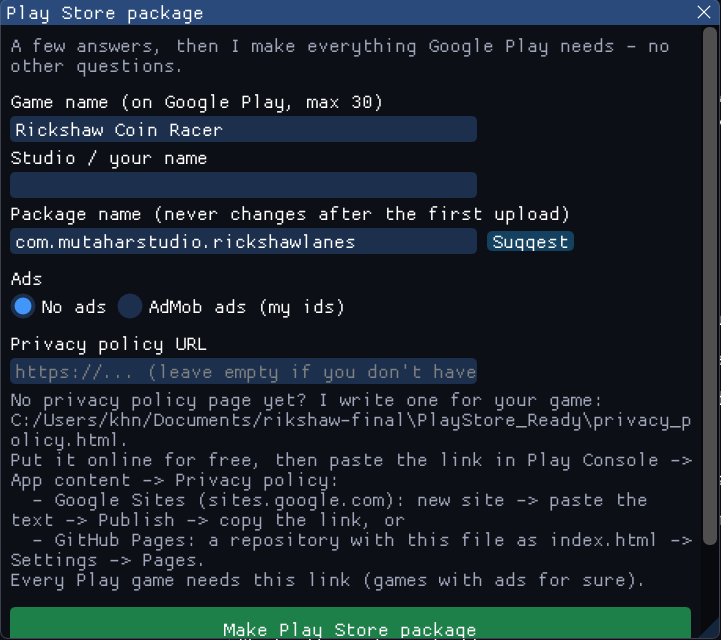
In Gaminode AI, open your game's chat and click Make Play Store package in the sidebar (or type "play store").
| Field | What to put |
|---|---|
| Game name | The name on Google Play, also used on the feature graphic and in the listing |
| Studio | Your developer name |
| Package name | Suggested as you type, like com.mutaharstudio.rickshawrush3d. It can never change after the first upload. |
| Ads | No ads, or your AdMob app ID and ad unit IDs (the format is checked). See AdMob. |
| Privacy policy URL | Google Play needs one. Leave it empty and the window explains where to host one, and writes a privacy_policy.html for you. |
2. The upload key
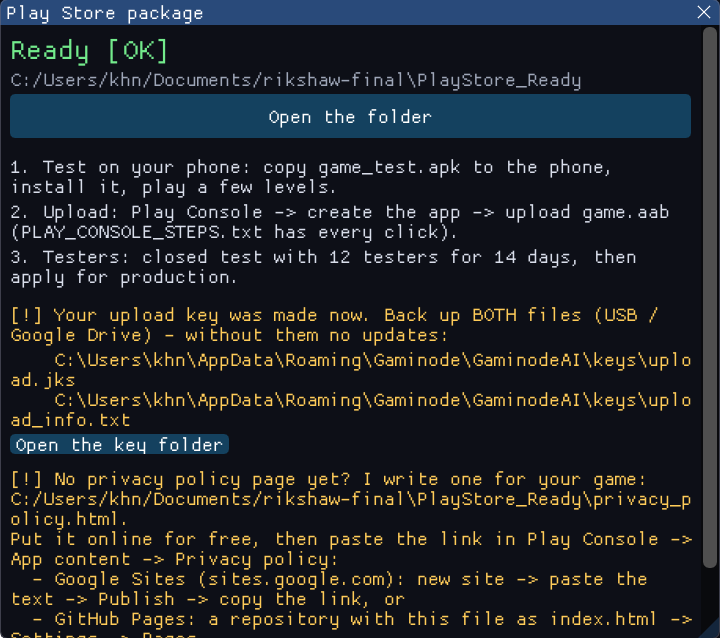
The first time, Gaminode makes your upload key (the keystore that signs your game). It is never replaced. The Ready screen shows where both files are and an Open the key folder button.
3. What you get
Everything goes into PlayStore_Ready\ inside your project:
| File | Use it for |
|---|---|
game.aab | Upload to the Play Console |
game_test.apk | Install on your own phone to test first |
icon_512.png | Store icon (512 × 512) |
feature_1024x500.png | Feature graphic (1024 × 500) |
screenshots\ | 4 real gameplay screenshots, made by playing your game (3D games too) |
listing.txt | Title, short description (80 characters) and full description |
PLAY_CONSOLE_STEPS.txt | Every click in the Play Console, including Data safety and content rating answers |
4. Then
- Test on your phone: copy
game_test.apkto it and open it (allow installs from unknown sources once). - Upload
game.aabin the Play Console. See Publishing on Google Play. - Testers: new personal developer accounts must run a closed test with 12 testers for 14 days before going live.
Updating your game
Change the game, then make the package again. It signs with the same upload key, so Google Play accepts it as an update. Every upload needs a higher version code than the last one; Health Check shows the current one.
Something wrong or missing on this page? Email gaminodeofficial@gmail.com.