Debugging and performance
When something goes wrong, the editor tells you where. When the game feels slow, the Gaminode Profiler tells you why, with advice in plain words.
Output and errors
Everything you print() appears in the Output panel. Errors appear in Debugger > Errors with the script and line; click one to jump there.
print("score: ", score)
push_warning("no player found")   # yellow in the Debugger
push_error("level file missing")  # red in the Debugger
Breakpoints
Click left of a line number in the script editor to add a breakpoint (or write breakpoint). When the game reaches it, it pauses and the Debugger shows every variable. Step line by line with F10 and F11; continue with F12.
The remote scene tree
While the game runs, click Remote at the top of the Scene panel to see the live node tree. Select a node to see and change its values in the Inspector as the game plays.
Gaminode Profiler
Open Debugger > Gaminode Profiler, choose a target (Mobile or Desktop), and press Start (or tick Measure every run). Run your game with F5 and play.
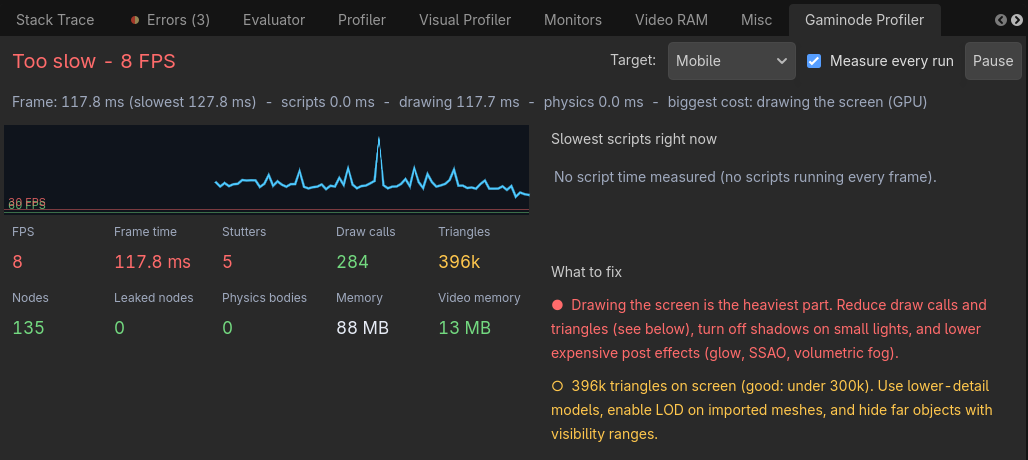
| Measure | What it tells you |
|---|---|
| FPS and frame time | How smooth the game is, against the target you chose |
| Stutters | Frames that took much longer than the rest (what players notice) |
| Draw calls and triangles | How much the GPU has to draw |
| Nodes and leaked nodes | How many nodes exist, and nodes that were removed but never freed |
| Physics bodies | How much the physics has to simulate |
| Memory and video memory | RAM and texture memory in use |
Under the numbers it gives advice, for example to reduce draw calls or free nodes you no longer use. A live graph shows each frame's time against the target.
Common problems
| Problem | Usual cause |
|---|---|
| Nothing hits my player | A body without a CollisionShape, or different collision layers and masks |
Invalid get index ... on base 'null instance' | A $Path that doesn't match the node's name, or a node that was freed |
| Works in the editor, broken after export | A broken link or a load() path that doesn't exist. Run Health Check |
| Slow on phones | Large textures, too many nodes, or a heavy renderer. Use Compatibility and check the profiler with the Mobile target |
Something wrong or missing on this page? Email gaminodeofficial@gmail.com.